

For students in Engineering, Architecture, or 3D Creative fields, choosing a laptop is a long-term investment that requires careful consideration. Our requirements are significantly tougher than the average user when selecting the right laptop.
We don’t just need a machine for typing documents. We need a laptop powerful enough to run specialized software like AutoCAD, SolidWorks, Revit, or Blender smoothly. It should do so without stuttering when deadlines are approaching. And of course, during our downtime, we want a machine capable of running AAA games at “High” settings to de-stress.
Today, we have selected two top-tier approaches in the market to dive into the details. This will help you clearly see which machine type best fits your study lifestyle and workflow in terms of laptop performance.
Option 1: The Performance Focus – Stable Workstation, Cool Temps, Massive Screen
Recommended Model: Lenovo Legion Slim 5
If your usage scenario involves sitting at a drafting desk or in a lab for long hours, and you need a machine that acts like a mobile workstation, continue reading. This machine should be ready to run heavy tasks continuously without performance drops. It is the most direct answer when choosing a suitable laptop.
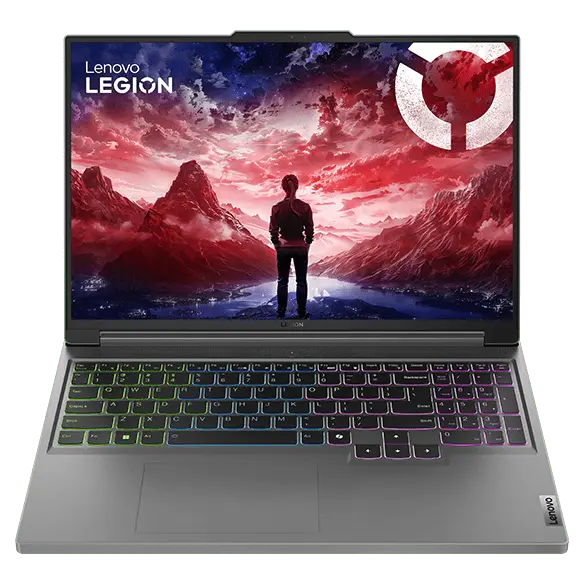
Why this model fits Engineering & Gaming:
- Superior Screen Real Estate: With a 16-inch screen and a 16:10 aspect ratio, you gain extra vertical space. This is crucial when viewing blueprints or managing timelines in editing software. You can see more details of your work without constantly scrolling or zooming, making it an efficient laptop choice.
- Cooling for Heavy Loads: Rendering 3D models or gaming sessions take time and generate high heat. This model is designed with a thermal system specifically to handle this load. It ensures stable frame rates and prevents the machine from throttling or crashing mid-task.
- The Indispensable Numpad: For engineering tasks that require inputting numerical values, coordinates, or model dimensions, the numpad is essential. Having a dedicated number pad on the right side allows you to work significantly faster than using the number row above the keyboard.
Best for: Those who prioritize maximum performance and stability for running programs above all else. They also do not frequently carry the machine to different locations.
Option 2: The Mobility Focus – Portable Power, Lightweight, Stylish Design
Recommended Model: ASUS ROG Zephyrus G14
If your life involves constant travel, carrying your laptop to present projects in front of the class, or switching buildings often, consider this balance. It is perfect if you refuse to downgrade to a low-spec ultrabook because you fear it can’t handle the workload. This option is the perfect balance.
Why this model fits Engineering & Gaming:
- Power in a Portable Form: This is a 14-inch laptop packed with top-tier specs. It can easily run structural calculation programs or graphically demanding games. All this power comes in a lightweight body that fits into a small backpack. It allows you to carry it anywhere without back pain.
- High-Quality Display for Design: Beyond gaming, the ROG Nebula display offers exceptional sharpness and color accuracy. This is ideal for architectural or design work where color correctness is critical.
- Outstanding Professional Image: With premium materials and a unique design, pulling this machine out for a presentation enhances your professional image. It makes you look modern and tech-savvy.
Best for:Those with an active lifestyle who value agility. You want desktop-level power that you can pack up and take to work anywhere in the world.
Choose the Tool that Empowers Your Work
The final decision should be based on a survey of your actual usage habits.
If your work requires staring at fine details, constant data entry via a numpad, and often involves overnight rendering, the Lenovo Legion Slim 5 will be your most reliable personal command center.
However, if you are always on the move, need to visit actual sites, or frequently present work to others, the ASUS ROG Zephyrus G14 is an investment that grants you freedom and agility, without the worry of your laptop not being powerful enough.
Choose the machine that fits your hand best, and this laptop will help turn the ideas in your head into reality. Additionally, it will help you relax in the gaming world excellently.
Lenovo Legion Slim 5 [Big Screen, Cool, Stable]
Lazada: Click to view price & specs
Shopee: Click to view price & specs
ASUS ROG Zephyrus G14 [Portable, Light, Stylish]
Lazada: Click to view price & specs
Shopee: Click to view price & specs

 โน้ตบุ๊กแบตอึดดูจากอะไร ถ้าต้องพกทุกวัน?
 การ์ดจอชื่อเดียวกัน ทำไมโน้ตบุ๊กเล่นเกมแรงต่างกัน?
 โน้ตบุ๊กเรียนแต่ละคณะต้องเช็กอะไร? เริ่มจากโปรแกรมที่จะใช้ส่งงาน